How to Install Prefabs
There are two ways to use prefabs from this site in Hytale. You can use our in-game mod for a seamless experience, or manually download and place the files yourself.
Using our In-Game Mod
RecommendedThe easiest way to use prefabs. Install our mod once, then paste any prefab directly in-game with a single command.
Download our Mod
Download the latest version of the 'HytalePrefabs.app Prefabs Paster' mod.
Download ModInstall the Mod
Open the Hytale Launcher, click the 'Settings' button in the top-left, and click 'Open directory'.
Place the 'HytalePrefabsPaster-0.1.0' file in the following folder:
Hytale/UserData/Mods/Enable the Mod
Launch Hytale, open the Worlds menu, and right-click the World to enable the mod on.
Enable the 'HytalePrefabs.app Prefab Paster' mod in the 'Mods' list.
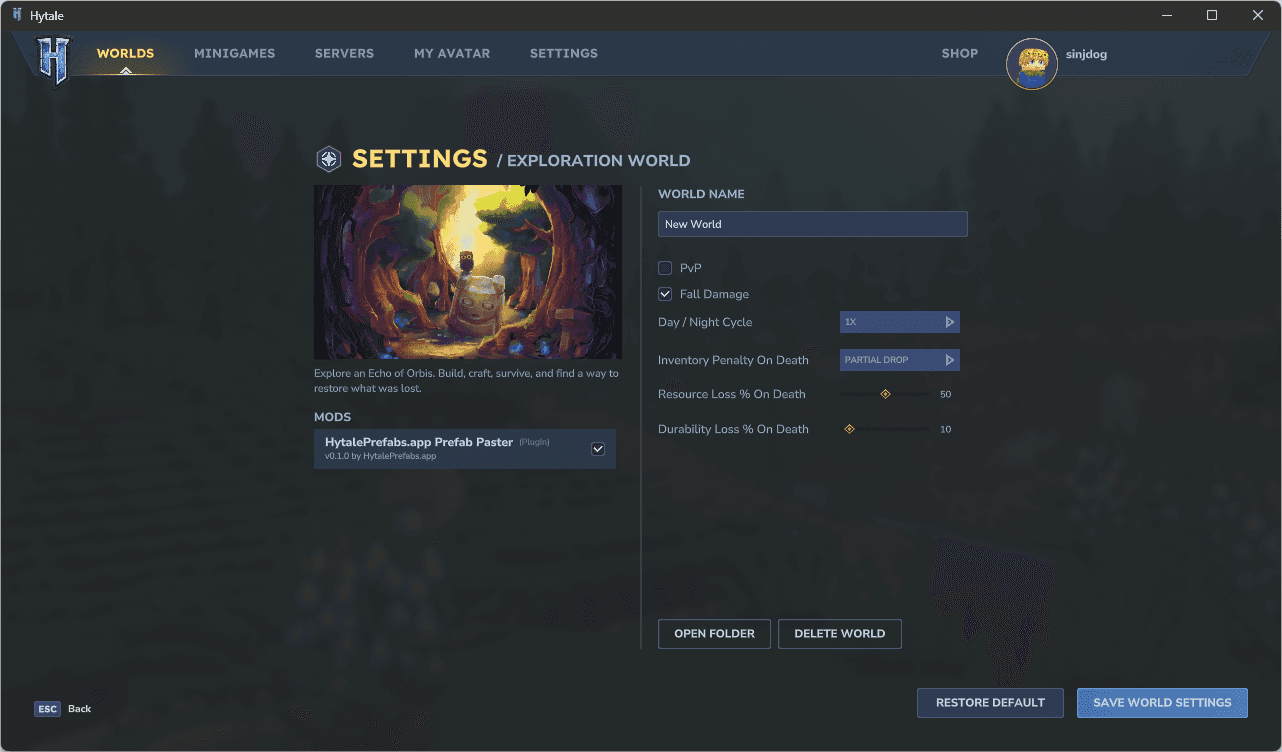
Use the In-Game Command
Join the world, open the chat, and use the following command with the UUID of the prefab you want to download. You can find the UUID on any prefab's page on this site.
/downloadprefab <uuid>The prefab will be downloaded and ready to paste into your world immediately by using the 'Paste Tool' or with the /paste command.
Manual Installation
If you prefer not to use the mod, you can download prefab files from this site and place them manually.
Download the Prefab File
Find a prefab you like on the Browse page and click the Download button. This will save a .prefab.json file to your computer.
Move File to Prefabs Folder
Open the Hytale Launcher, click the 'Settings' button in the top-left, and click 'Open directory'.
Place the downloaded .prefab.json file in the following folder:
Hytale/UserData/Saves/<WorldName>/prefabsUse in Hytale
Launch Hytale, join the world and use the /prefab list command. Switch 'Assets' to 'Server' and select the prefab you downloaded. Now use the 'Paste Tool' or the /paste command.
Ready to get started?
Browse community-created prefabs and start building.